
If you’re asking yourself why my website is not ranking on Google, you’re not alone. Many small business owners build a website, publish it, and then wait—only to realize weeks or even months later that it’s still not appearing in Google search results.
The good news?
This is very common, especially for beginners and local businesses, and most issues are fixable.
In this guide, I’ll walk you through the 9 most common reasons your website or business may not be showing up on Google—and what you can realistically do about each one. No technical background required.
You Haven’t Claimed or Properly Optimized Your Google Business Profile
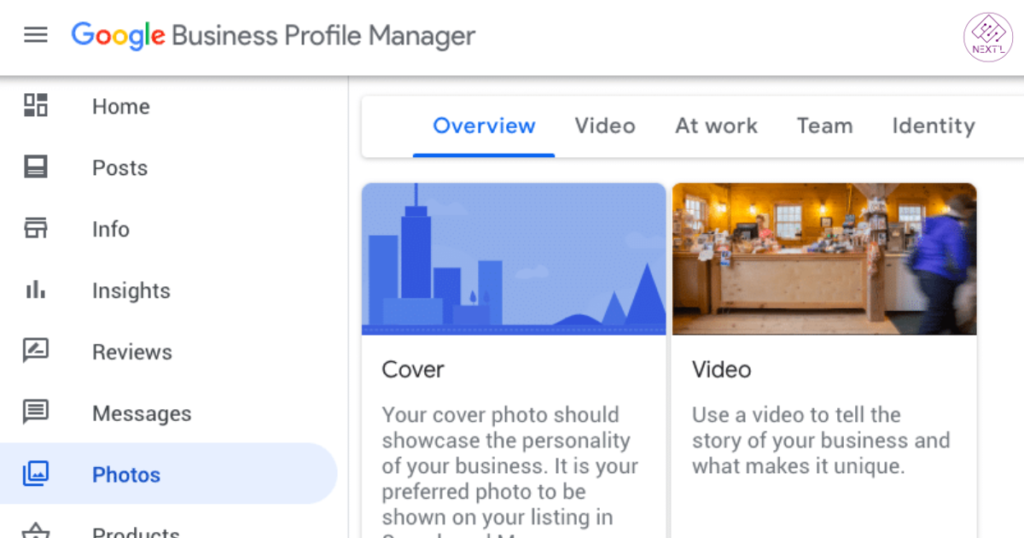
For local businesses, Google doesn’t rely only on your website. It heavily depends on your Google Business Profile (formerly Google My Business).
If your profile is unclaimed, unverified, or incomplete, your business may not appear in Google Maps results or local search results at all.
Why this matters
Google uses your profile to understand:
- Who you are
- What services you offer
- Where you’re located
Without proper Google Business Profile verification, Google may not trust your business enough to show it.
Common mistakes
- You created a profile but never verified it
- Important details are missing (hours, category, services)
- You haven’t added photos or a description
Simple fix
- Claim and verify your Google listing
- Choose the most accurate business category
- Add photos, services, and a clear business description
- Keep everything up to date
This alone fixes a huge percentage of “business not showing up on Google Maps” problems.
Your Business Information Is Incorrect or Inconsistent Across the Web (NAP Issues)
NAP stands for Name, Address, and Phone number.
If this information is different across websites, Google gets confused.
Why inconsistent info hurts rankings
Google compares your business details across:
- Google Business Profile
- Your website
- Online directories (like Yelp or Facebook)
If the details don’t match, Google may limit your visibility.
Common issues
- Old phone number on some websites
- Slightly different business name variations
- Old address still listed online
Simple fix
- Make sure your NAP is exactly the same everywhere
- Update major directories first
- Check your website footer and contact page
Consistency helps Google trust your business.
Your Website Doesn’t Exist or Isn’t SEO-Optimized
Yes, a business can appear on Google without a website—but having one improves your chances a lot.
If your site exists but lacks basic SEO, Google may not understand what it’s about.
Common beginner issues
- No clear explanation of services
- No location mentioned
- Pages with very little content
Simple fixes
- Clearly explain what you do on your homepage
- Mention your service areas naturally
- Use clear headings and readable text
- Make sure your site works well on mobile
You don’t need advanced SEO—just clarity.
Google Hasn’t Crawled or Indexed Your Website Yet
Sometimes the problem isn’t quality—it’s visibility.
If Google hasn’t found or indexed your site, it won’t rank at all.
What this means (in simple terms)
- Crawling = Google discovers your site
- Indexing = Google stores it in its search system
No indexing means no rankings.
How to check
- Search:
site:yourwebsite.comon Google - If nothing appears, your site may not be indexed
Simple fix
- Set up Google Search Console
- Submit your website and request indexing
- Make sure your site isn’t blocking Google
This is a common reason why new websites don’t appear.
You’re Targeting the Wrong Keywords or No Local Keywords
Another big reason people ask why my website is not ranking on Google is keyword mismatch.
Common mistakes
- Using keywords customers never search
- Targeting very broad terms
- Not using location-based phrases
For example:
People don’t usually search “best quality plumbing solutions.”
They search “plumber near me” or “plumber in Dallas.”
Simple fix
- Think like your customer
- Use service + location naturally
- Avoid repeating the same phrase too many times
Your goal is clarity, not stuffing keywords.
Your Business Is New or Has a Weak Online Presence
If your website or Google profile is new, Google needs time to trust it.
This is normal.
Why new sites struggle
- No reviews yet
- Few mentions online
- No history with Google
Simple ways to build presence
- Ask real customers for reviews
- Keep your Google profile active
- Publish helpful content on your site
- Get listed in local directories
Growth takes time, but steady effort works.
You Don’t Have Enough Google Reviews or Customer Trust Signals
Reviews don’t just influence customers—they influence Google too.
Businesses with more real reviews tend to show up more often in local results.
Common problems
- No reviews at all
- Old reviews only
- Ignoring customer feedback
Simple fix
- Ask happy customers politely
- Respond to every review
- Never use fake reviews
Trust signals help both rankings and clicks.
Your Market Is Highly Competitive
Sometimes your website is fine—but the competition is tough.
If many businesses offer the same service in the same area, rankings are harder.
What this means
- Google has limited space in local results
- Established businesses may rank first
What beginners can do
- Be more specific (niche services)
- Create helpful, local content
- Keep improving your profile and site
Consistency beats shortcuts.
Google Is Penalizing or Limiting Your Visibility
In some cases, Google limits visibility due to guideline issues.
This doesn’t always mean a full penalty—but it can hurt rankings.
Common beginner mistakes
- Keyword stuffing in business name
- Using virtual or fake addresses
- Duplicate listings
Simple fix
- Follow Google’s business guidelines
- Remove misleading information
- Keep everything honest and accurate
If your business information is clean, you’re usually safe.
How to Fix the Problem and Start Showing Up on Google
If your website or business isn’t ranking, don’t panic.
Start with this order:
- Claim and verify your Google Business Profile
- Fix business information consistency
- Make sure your website is indexed
- Improve clarity, not complexity
- Be patient and consistent
Most improvements take weeks, not days—but they work.
Final Thoughts
If you’re wondering why my website is not ranking on Google, remember this:
Most ranking problems are not permanent.
Google rewards clarity, consistency, and patience.
Focus on helping real people understand your business—and Google will eventually follow.
Take it one step at a time.
FAQs
Why is my business not showing up on Google search?
This usually happens because your Google Business Profile isn’t verified, your information is incomplete or inconsistent, or your website is new and not indexed yet.
How do I make my business visible on Google?
Claim and verify your Google Business Profile, keep your business details accurate, add services and photos, and make sure your website is clear and easy for Google to understand.
How long does it take for Google My Business to show up?
After verification, it can take a few days to a couple of weeks for your business to start appearing in Google Search and Maps.
Why is my Google business not publicly visible?
Your profile may be unverified, suspended, recently updated, or missing required information, which can temporarily limit its visibility.
How much does it cost to get my business listed on Google?
Listing your business on Google through a Google Business Profile is completely free.